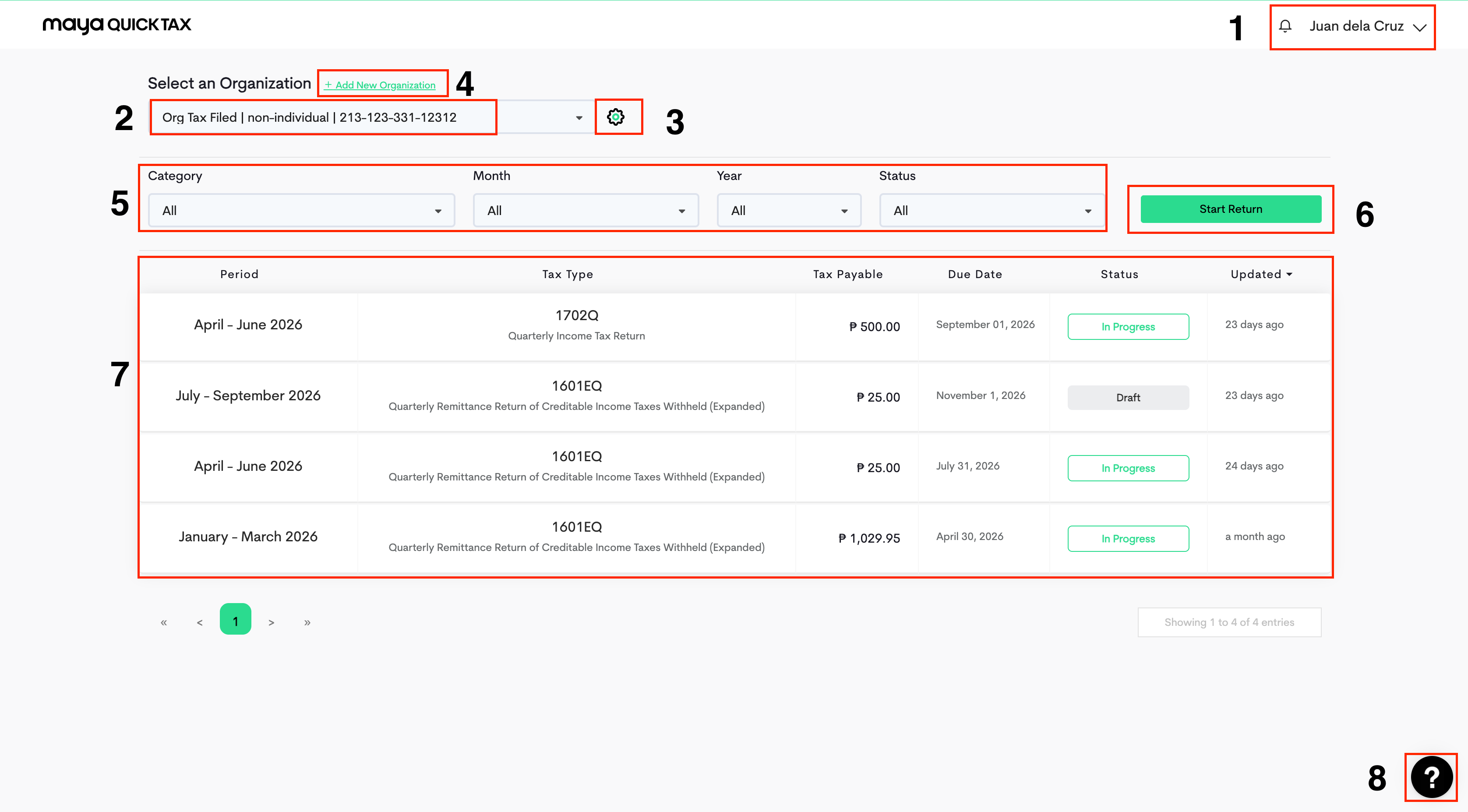
We've made it simple for you to explore your account and check important information in one, easy-to-access place.
The panels on your Maya Quick Tax Dashboard consists of:
Account Name - This part is where you can manage your Account Settings, Security, Credits, Join a Webinar or Log out from Maya Quick Tax.
Select an Organization - This gives you the list of entities or individual organizations that you have created in your account. It also shows the organization's classification, Tax Identification Number, and current status.
Gear Icon (Organization Settings) – Allows you to edit organization details and delete the organization.
Add New Organization - Just above the Select an Organization dropdown field, this allows you to create a fresh organization.
Dropdown filters - This function allows you to choose which forms to appear in your Return Summary Panel. You can filter by Form Type, Month & Year Filed, and Status of the return.
Start Return Button- This button is for generating a new Tax Return.
Return Summary Panel- Shows the Return Period of the Tax Form, Tax Type, The amount of tax you need to pay, due dates, form status, and the number of hours or days the return was last updated.
Chat Support (Bottom Right Corner) – Located at the lower right side of the screen. Click this icon to connect with support for assistance with account concerns, filing questions, or technical issues while using Maya Quick Tax.